Networking
Unreal Engine features a robust networking framework that powers some of the world's most popular online games, helping to streamline this process. This page provides an overview of the concepts that drive multiplayer programming, and the tools for building network gameplay that are at your disposal.
In a multiplayer session, game state information is communicated between multiple machines over an internet connection rather than residing solely on a single computer. This makes multiplayer programming inherently more complex than programming for a single-player game, as the process of sharing information between players is delicate and adds several extra steps.

Reliability
You must designate Remote Procedure Calls as being reliable or unreliable, reliable RPCs are guaranteed to arrive at their intended destination, and will remain in a queue until they are successfully received, unreliable RPCs aren't guaranteed to arrive at their intended destination, but they can be sent faster and more frequently than reliable RPCs.
Functions that are critical to gameplay, but that do not get called very frequently are reliably appropriate such as Collision events, starting or ending the firing of a weapon or spawning Actors. Actor movement is replicated using an unreliable Remote Procedure Call due to the fact that it can change every frame, as example.
Validation
WithValidation specifier indicates that in addition to an implementation of the function, there will also be a function that validates the data of the incoming function call. This validation function has the same signature as the function that it's responsible for, but it returns a boolean instead of its original return value. If it returns true then it permits the Remote Procedure Call's Implementation to execute, and if it returns false it prevents execution.
bool AExampleClass::MyFunction_Validation(int myInt)
{
    /*
        If the value of myInt is negative, we do not want to allow MyFunction_Implementation to run.
        Therefore we only return true if myInt is greater than zero.
    */
    return myInt >= 0;
}
Client Ownership
Pawns in a network game are owned by a PlayerController on a specific client's machine. Any time that Pawn calls a client-only function, it will be directed only to the owning player's machine no matter which machine calls the function. Actors that have their Owner variable set to a specific Pawn belong to that Pawn's owning client by association, and will also direct client-only functions to their owner's machine. You may use the IsLocallyControlled function in C++, or the Is Locally Controlled node in Blueprint, to determine whether or not an Pawn is on its owning client.
You will hear a lot about the owning connection of an actor. Ultimately, each connection has a PlayerController, created specifically for that connection (read more about this process in the client connection flow details). Each PlayerController that is created for this reason, is owned by that connection. To determine if an actor in general is owned by a connection, you query for the actors most outer owner, and if the owner is a PlayerController, then that actor is also owned by the same connection that owns the PlayerController.
One example of this is when Pawn actors are possessed by a PlayerController. Their owner will be the PlayerController that they are possessed by. During this time, they are owned by the connection of the PlayerController. The Pawn is only owned by this connection during the time it's also owned/possessed by the PlayerController. So as soon as the PlayerController no longer possesses the Pawn, the Pawn is no longer owned by the connection.
Another example is inventory items that are owned by a Pawn. These inventory items are owned by the same connection (if any) that might own that Pawn.
Components are a little special in how they determine their owning connection. In this case, we first determine the components owner by walking the components outer chain until we find the owning actor, and then we continue as above by determining owning connection of this actor.
Connection ownership is important for a few things:
- Remote Procedure Calls need to determine which client will execute a run-on-client Remote Procedure Call
- Actor replication and connection relevancy
- Actor property replication conditions when the owner is involved
Connection ownership is important for things like Remote Procedure Calls, because when you call an Remote Procedure Call function on an actor, unless the Remote Procedure Call is marked as multicast, it needs to know which client to execute that Remote Procedure Call on. It determines the connection to send the Remote Procedure Call to by finding the owning connection.
Connection ownership is used during actor replication, and determining which connections get updates for each actor. For actors that have bOnlyRelevantToOwner set to true, only the connection that owns that actor will receive property updates for that actor. By default, all PlayerControllers have this flag set, and this is why each client only receives updates for PlayerControllers that they own. This is done for various reasons, the main ones being to prevent players from cheating and efficiency.
Connection ownership is important during property replication involving conditions that use the owner. For example. When COND_OnlyOwner is used, only the owners of that actor will receive these property updates.
Lastly, the owning connection is important for actors that are autonomous proxies (Role is ROLE_AutonomousProxy). For these actors, their role is downgraded to ROLE_SimulatedProxy while their properties are replicated to connections that don't own these actors.
Remote Procedure Calls
Remote Procedure Calls (Server, Client & NetMulticast) are also referred to as replicated functions. They can be called from any machine, but will direct their implementation to happen on a specific machine that is connected to the network session.
Primary use case for these features are to do unreliable gameplay events that are transient or cosmetic in nature. Events could include things such as play sounds, spawn particles, or do other temporary effects that are not crucial to the Actor functioning. When using Remote Procedure Calls, it's also important to understand how ownership works, since it determines where most Remote Procedure Calls will run. Once you have designated a function as an Remote Procedure Call, you can give it gameplay logic and call it the way that you would with any other function.
Recently, the ability to add validation functions to Remote Procedure Calls was added to serve as a choke point for detecting bad data & inputs. Idea is if the validation function for an Remote Procedure Call detected that any of the parameters were bad, it could notify the system to disconnect the client & server who initiated the Remote Procedure Call.
Code implementations use the suffix _Implementation & _Validate.
UFUNCTION(Server, Reliable, WithValidation)
void MyFunction(int myInt);
void AExampleClass::MyFunction_Implementation(int myInt)
{
}
bool SomeRPCFunction_Validate(int32 AddHealth)
{
    if (AddHealth > MAX_ADD_HEALTH)
    {
        // This will disconnect the caller
        return false;
    }
    // This will allow the RPC to be called
    return true;
}
Authority & Role
An Actor's network role determines whose machine has control over the Actor during a network game. An authoritative Actor is considered to have control over that Actor's state, and will replicate information to other machines within the network multiplayer session. A remote proxy is a copy of that Actor on a remote machine, and it receives replicated information from the authoritative Actor. This is tracked by the Local Role and Remote Role variables, which can take the following values:
Default model used by Unreal Engine is server-authoritative, meaning that the server always has authority over the game state, and information will always replicate from the server to clients. You would expect an Actor on the server to have a Local Role of Authority, and you would expect its counterparts on remote clients to have a Local Role of either Simulated or Autonomous Proxy.
if (GetLocalRole() == ROLE_Authority)
 {
    HitNotify.Origin = Origin;
    HitNotify.RandomSeed = RandomSeed;
    HitNotify.ReticleSpread = ReticleSpread;
 }
Modes & Server Types
Listen servers are easy for users to set up spontaneously since any user with a copy of the game can both start a listen server and play on the same computer. Games that support listen servers often feature an ingame UI for starting a server or searching for servers to join. However, because the player who is hosting a listen server is playing on the server directly, they have an advantage over other players that must use a network connection to play, which raises concerns about fairness and cheating.
Also there is an extra processing load associated with running as a server and supporting player-relevant systems like graphics and sound. Factors like these make listen servers less suitable for games in highly competitive settings or games with very high network loads associated with them, but very convenient for casual cooperative and competitive multiplayer among a small group of players.
Dedicated servers are more expensive and difficult to configure, requiring a separate computer from all of the players that would participate in a game, complete with its own network connection. However, all players joining a dedicated server experience the game with the same type of connection, which ensures fairness. Since a dedicated server doesn't render graphics or perform other logic that would only be relevant to a local player, it's also able to process gameplay and networking more efficiently.
So this makes dedicated servers preferable for games requiring a large number of players or games requiring a high-performing, trusted server for either security, fairness, or reliability reasons. Such games would include MMOs, competitive MOBAs, or fast-paced online shooters.
Relevance & Priority
Relevance is used to determine whether or not it's worthwhile to replicate an Actor during a multiplayer game. Actors that are not considered relevant are culled during replication. This saves bandwidth so that Actors that are relevant can replicate more efficiently. You can manually control relevance by overriding the IsNetRelevantFor function, and you can determine the distance at which an Actor is relevant using the NetCullDistanceSquared property. If an Actor is not owned by any players and not physically near any players, then it's not considered relevant and doesn't replicate.
Priority values are used to determine which Actors get to replicate first, as sometimes there is not enough bandwidth available to replicate all relevant Actors during a single frame of gameplay. By default, Pawns and PlayerControllers have a NetPriority of 3.0, which makes them the highest-priority Actors in a game, while base Actors have a NetPriority of 1.0. An Actor's priority will get higher with each successive pass until it's replicated.
RepNotifies are preferable over using Remote Procedure Calls or replicated functions, as they can be added to variables that you would need to replicate regardless of other gameplay functionality, saving a significant amount of bandwidth over creating additional network calls.
Replication
Actor Replication
Replication is the process of reproducing game state information between different machines in a network session. If replication is set up correctly, the different machines' instances of the game become synchronized. By default, most Actors do not have replication enabled and will perform all of their functions locally. You can enable replication for Actors of a given class by setting the bReplicates variable in a C++ Actor class or the Replicates setting of an Actor Blueprint to true.
While common use cases like creation, destruction, and movement can be handled automatically, all other gameplay features do not automatically replicate by default, even when you enable replication. You must designate exactly which variables and functions you want to replicate as is appropriate to your game. Detailed information on all of the above replication features is available in the Actor Replication guide.
Variable Replication
You can add replication to variables and object references either by using the Replicated or ReplicateUsing specifiers in their UPROPERTY macros in C++, or by designating them as Replicated in the Details Panel in Blueprint. Whenever a replicated variable's value changes on an authoritative Actor, its information is automatically sent from the authoriative Actor to the remote proxies connected to the session.
You can designate a RepNotify function that will be called in response to an Actor successfully receiving replicated information for specific variables. RepNotifies only trigger locally when a variable is updated, making them a low-overhead way to trigger gameplay logic in response to variable changes on an authoritative Actor. You can access this functionality by using the ReplicatedUsing specifier in a variable's UPROPERTY macro in C++, or by changing the Replication setting for the variable in Blueprint to use a RepNotify.
UPROPERTY(Transient, Replicated)
TArray<int32> TeamScores;
 UPROPERTY(Transient, ReplicatedUsing=OnRep_HitNotify)
 FInstantHitInfo HitNotify;
GAMEPLAYATTRIBUTE_REPNOTIFY(ClassName, PropertyName, OldValue);
Property Replication
Each Actor maintains a list of all properties that include the Replicated Specifier. The server will send an update to each client whenever a replicated property changes its value, which the client will apply to its local version of the Actor. These updates only come from the server; the client will never send property updates to the server or other clients.
Actor property replication is reliable. This means that the property of the client version of the Actor will eventually reflect the value on the server, but the client will not necessarily receive notification of every individual change that happens to a property on the server. For example, if an integer property rapidly changes its value from 100 to 200, and then to 300, the client will eventually receive an update with the value of 300, but there is no guarantee that the client will know about the change to 200.
Changing a replicated variable's value on the client is not recommended. The value will continue to differ from the server's value until the next time the server detects a change and sends an update. If the server's copy of the property doesn't change very often, it could be a long time before the client receives a correction.
If you want to replicate a property, you need to do a few things: You need to make sure you have the replicated keyword as one of the parameters to the UPROPERTY declaration, in the header of the actor class where the property is defined
class ENGINE_API AActor : public UObject
{
    UPROPERTY(replicated)
    AActor* Owner;
};
void AActor::GetLifetimeReplicatedProps(TArray<FLifetimeProperty>& OutLifetimeProps) const
{
    DOREPLIFETIME(AActor, Owner);
    DOREPLIFETIME_CONDITION(AActor, ReplicatedMovement, COND_SimulatedOnly);
}
AActor::AActor(const class FPostConstructInitializeProperties & PCIP) : Super(PCIP)
{
    bReplicates = true;
}
Owner member variable will now be synchronized to all connected clients for every copy of this actor type that is currently instantiated.
Adaptive Network Update Frequency?
With Adaptive Network Update Frequency, we can save CPU cycles that would normally be wasted in redundant attempts to replicate an actor when nothing is really changing. When this feature is enabled, the system will dynamically adapt the update frequencies of individual Actors based on whether or not their updates are meaningful.
By default, this feature is deactivated. Using this feature can result in massive replication performance improvement. Setting the console variable net.UseAdaptiveNetUpdateFrequency to 1 will activate it.
Client-Server
Client-Server model means that there will be a single server that will be authoritative over game state, while connected clients will maintain a close approximation. Server is an important part of Multiplayer, it contains all of the authoritative state & handles client connections, travelling to new maps, the overall gameplay flow of starting a match, ending a match etc.. When run locally as standalone, players connect input to a single computer and control everything on it directly. Everything in the game, including the Actors, the world & the user interface for each player exists on that local machine.
When run as network multiplayer game, Unreal Engine's client-server model comes to use. One computer in the network acts as a server and hosts a session of a multiplayer game, while all of the other players computers connect to the server as clients. Gamestate information then gets shared via a server to each connected client and provides a means for them to communicate. As the host of the game, the server holds the one true authoritative game state.
In other words, the server is where the multiplayer game is actually happening. Clients each remote-control Pawns that they own on the server, sending procedure calls to them in order to make them perform ingame actions. However, the server doesn't stream visuals directly to the clients monitors. Instead, the server replicates information about the game state to each client, telling them what Actors should exist, how those Actors should behave, and what values different variables should have. Simulating a very close approximation of what is happening on the server, each client then uses this information.
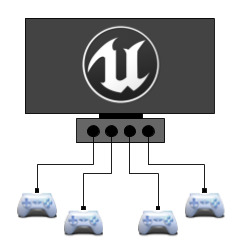
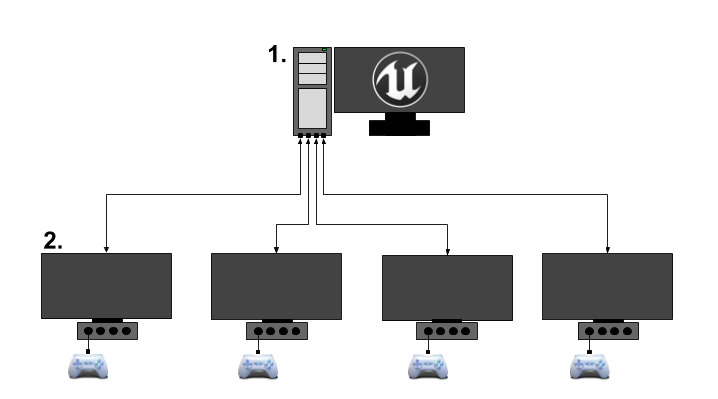
Server Gameplay Flow
Server is in charge of driving the flow of gameplay. It's the server's job to notify clients that it's time to travel to a new map, when gameplay starts and ends, along with actor replication updates, etc.. Major framework portions are mostly out of the scope of this document, but we can talk about some of the additional multiplayer nuances introduced when dealing working with certain classes.
Gamestate and flow are generally driven through the GameMode actor. Only the server contains a valid copy of this actor (the client doesn't contain one at all). For communicating this state to the client, there is a GameState actor, that will shadow important state of the GameMode actor. This GameState actor is marked to be replicated to each client. Clients will contain an approximate copy of this GameState actor, and can use this actor as a reference to know the general state of the game.
Connection Process
For a server to have anything interesting to do from a networking perspective, it needs to have clients connected. When a new client connects for the first time, a few things happen. First, the client will send a request to the server to connect. The server will process this request, and if the server doesn't deny the connection, will send a response back to the client, with proper information to proceed.
Major steps are.. the client sends a connect request and if the server accepts, it will send the current map. Server then will wait for the client to load this map, once loaded the server will locally call AGameModeBase::PreLogin. If accepted, the server calls AGameModeBase::Login. Role of this function is to create a PlayerController, which will then be replicated to the newly connected client. Once received, this PlayerController will replace the clients temporary PlayerController that was used as a placeholder during the connection process. Assuming everything went well, AGameModeBase::PostLogin is called. At this point, it's safe for the server to start calling Remote Procedure Calls functions on this PlayerController.
Travelling in Multiplayer
Seamless and non-seamless travel
Unreal Engine provides two ways to travel, seamless and non-seamless. Seamless travel is a non-blocking operation, while non-seamless will be a blocking call. When a client executes a non-seamless travel, the client will disconnect from the server and then re-connect to the same server, which will have the new map ready to load. It's recommended that Unreal Engine multiplayer games use seamless travel when possible. It will generally result in a smoother experience, and will avoid any issues that can occur during the reconnection process.
A non-seamless travel must occur in those three ways.. when loading a map for the first time, when connecting to a server for the first time as a client & when you want to end a multiplayer game, and start a new one .
There are three main function that drive travelling: UEngine::Browse, UWorld::ServerTravel and APlayerController::ClientTravel. When trying to figure which one to use, those can be a bit confusing, so here are some guidelines that should help.
| UEngine::Browse | UWorld::ServerTravel | APlayerController::ClientTravel |
|---|---|---|
| Is like a hard reset when loading a new map. Will always result in a non-seamless travel. Will result in the server disconnecting current clients before travelling to the destination map. Clients will disconnect from current server. Dedicated server cannot travel to other servers, so the map must be local (cannot be URL). If called from a server, will instruct the particular client to travel to the new map (but stay connected to the current server) | For the server only. Will jump the server to a new world/level. All connected clients will follow. This is the way multiplayer games travel from map to map, and the server is the one in charge to call this function. The server will call APlayerController::ClientTravel for all client players that are connected. | If called from a client, will travel to a new server. If called from a server, will instruct the particular client to travel to the new map (but stay connected to the current server) |
Enabling Seamless Travel
You need to setup a transition map, to enable seamless travel, this is configured through the UGameMapsSettings::TransitionMap property. By default this property is empty, and if your game leaves this property empty, an empty map will be created for the transition map. Reason the transition map exists, is that there must always be a world loaded (which holds the map), so we can't free the old map before loading the new one.
Since maps can be very large, it would be a bad idea to have the old and new map in memory at the same time, so this is where the transition map comes in. So now we can travel from the current map to the transition map, and then from there we can travel to the final map. Since the transition map is very small, it doesn't add much extra overhead while it overlaps the current and final map. Once you have the transition map setup, you set AGameModeBase::bUseSeamlessTravel to true, and from there seamless travel should work!
Seamless Travel Flow
Here is the general flow when executing seamless travel.. mark actors that will persist to the transition level, travel to the transition level, mark actors that will persist to the final level & travel to final level
Persisting Actors across Seamless Travel
When using seamless travel, it's possible to carry over (persist) actors from the current level to the new one. This is useful for certain actors, like inventory items, players, etc.
By default, these actors will persist automatically.. The GameMode actor (server only) Any actors further added via AGameModeBase::GetSeamlessTravelActorList All Controllers that have a valid PlayerState (server only) All PlayerControllers (server only) All local PlayerControllers (server and client) Any actors further added via APlayerController::GetSeamlessTravelActorList called on local PlayerControllers
Tips
- Use as few Remote Procedure Calls or replicated Blueprint functions as possible. If you can use a RepNotify instead, you should.
- Use Multicast functions especially sparingly, as they create extra network traffic for each connected client in a session.
- Server-only logic doesn't necessarily have to be contained in a server Remote Procedure Call if you can guarantee that a non-replicated function will only execute on the server.
- Be cautious when binding Reliable Remote Procedure Calls to player input. Players can repeatedly press buttons very rapidly, and that will overflow the queue for Reliable Remote Procedure Calls. You should use some way of limiting how often players can activate these.
- If your game calls an Remote Procedure Call or replicated function very often, such as on Tick, you should make it Unreliable.
- Some functions can be recycled by calling them in response to gameplay logic, then calling them in response to a RepNotify to ensure that clients and servers have parallel execution.
- You can check an Actor's network role to see if it's
ROLE_Authorityor not. This is a useful method for filtering execution in functions that activate on both server and client. - You can check if a Pawn is locally controlled by using the
IsLocallyControlledfunction in C++ or the Is Locally Controlled function in Blueprint. This is useful for filtering execution based on whether it's relevant to the owning client. - Avoid using
IsLocallyControlledin constructor scripts, as it's possible for a Pawn not to have a Controller assigned during construction.